ShiftCompass Open the live demo

Scheduling software for residency and fellowship programs

Block and call schedules, built from rules you write in plain English.

Write the program's rules as ordinary sentences. ShiftCompass generates the year's block schedule and the call schedule, checks every rule against the result, and explains any cell when you click it. Residents submit preferences in a portal and see which of their requests were honored.

No sign-in for the demo. Lakeview, the program in it, is made up.

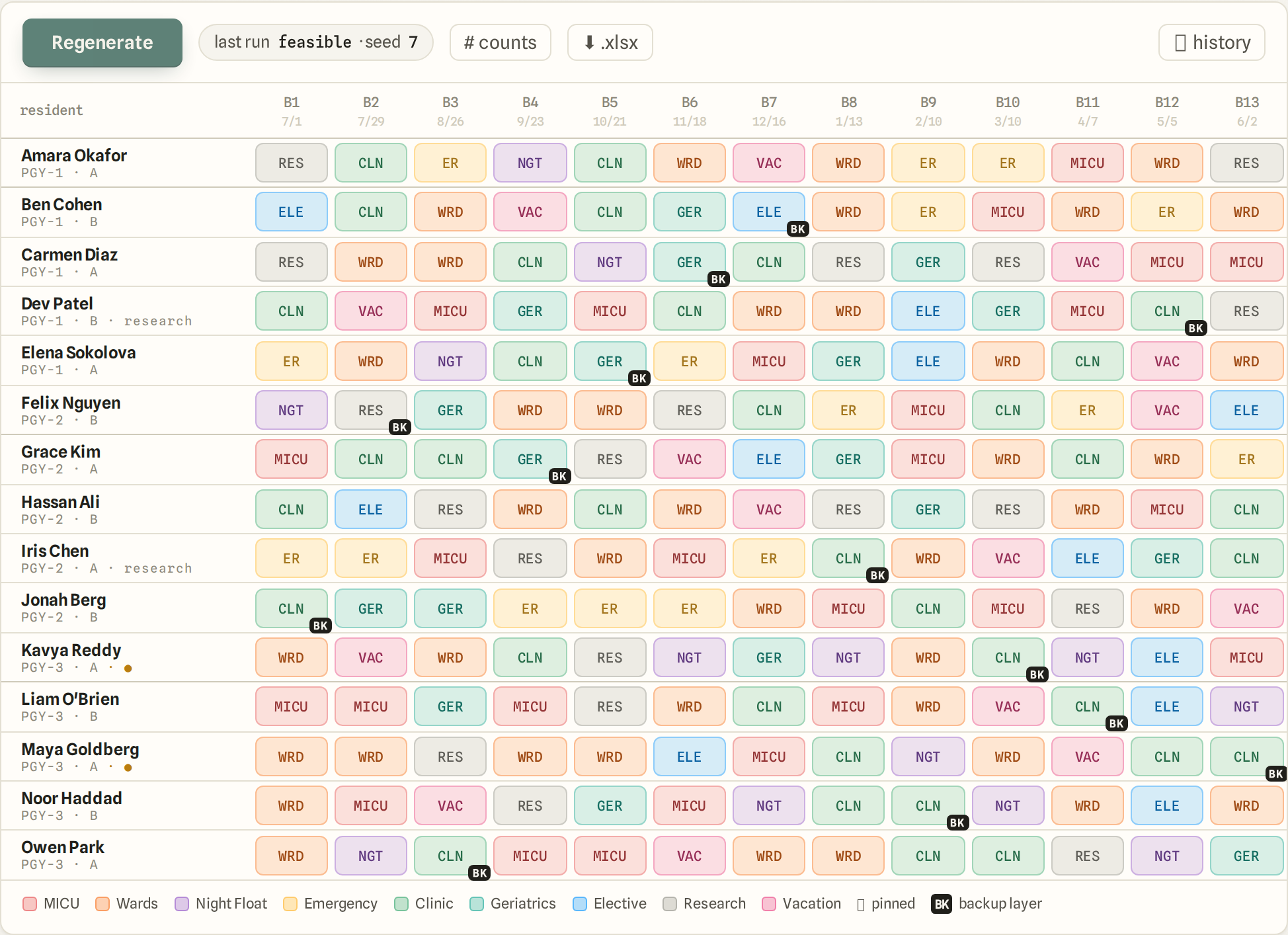
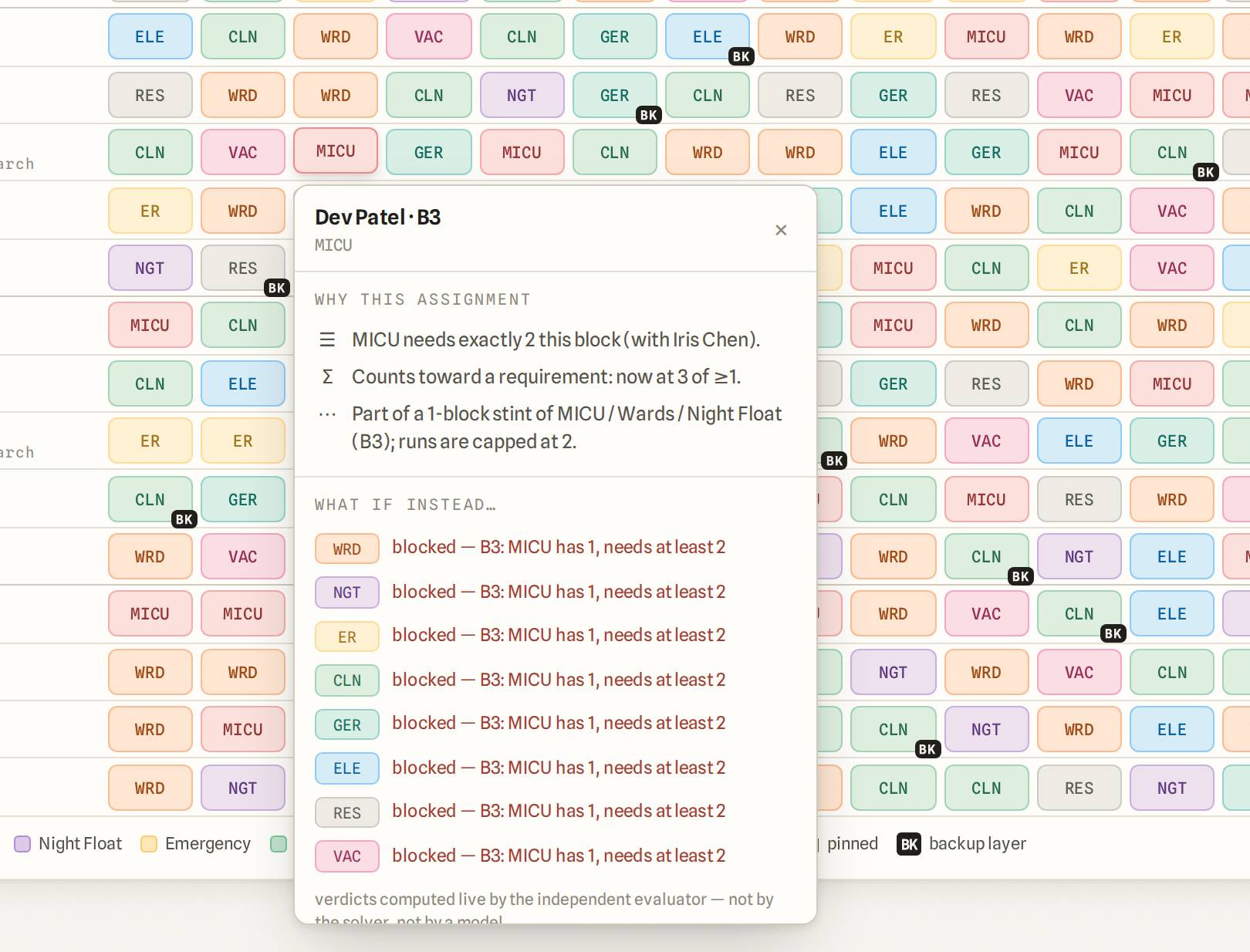
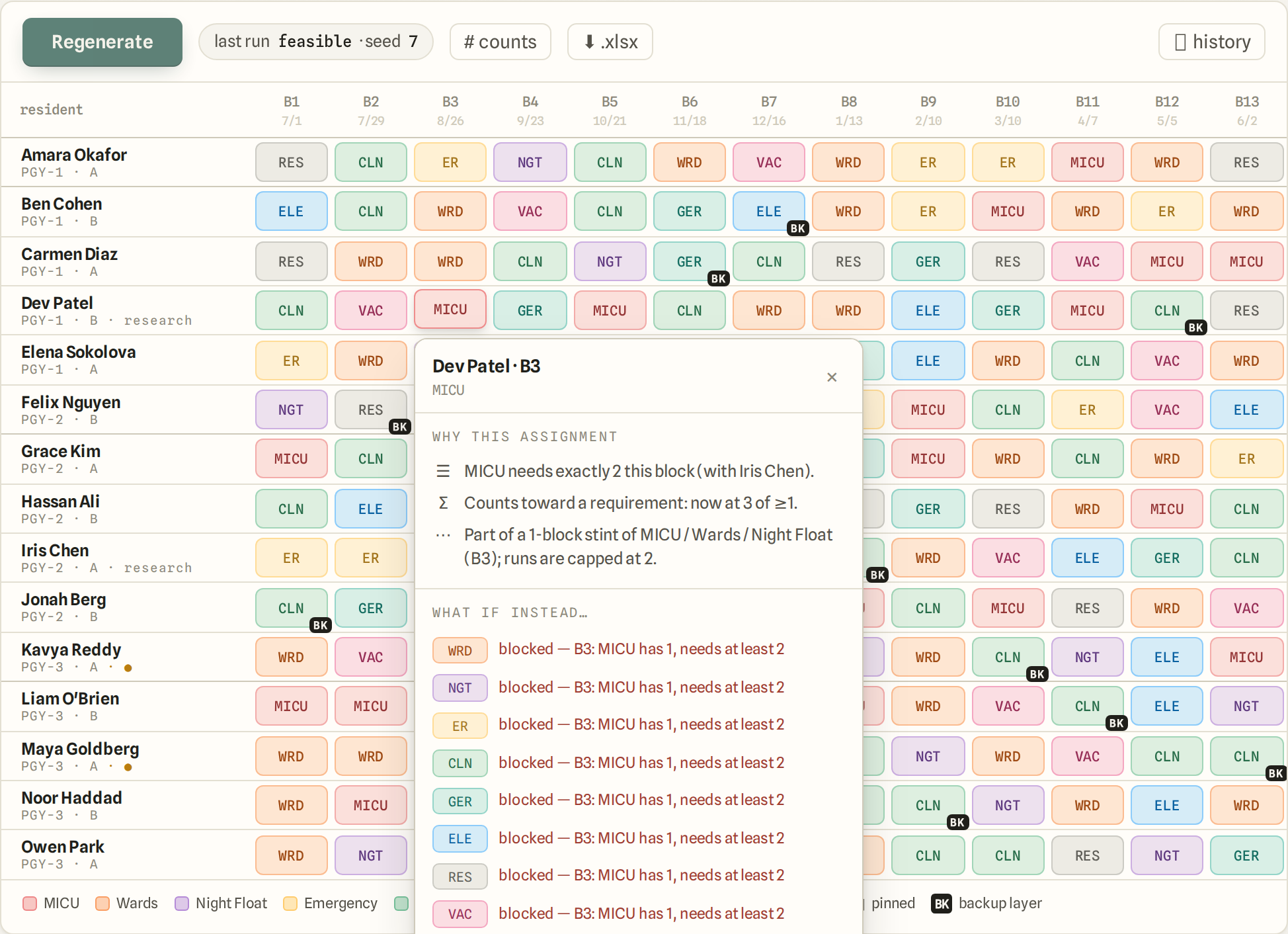
The Lakeview block schedule: one row per resident, one column per block, a rotation chip in every cell. One cell is open and lists the rules that put Dev Patel on MICU in block 3 and what blocked each other rotation.
Lakeview Internal Medicine: 15 residents, 13 blocks. One cell is open — the rules that put Dev Patel on MICU in block 3, and what blocked each other rotation. Every screenshot on this page is Lakeview.

Who it is for.

How a schedule gets made.

1

Say the rule.

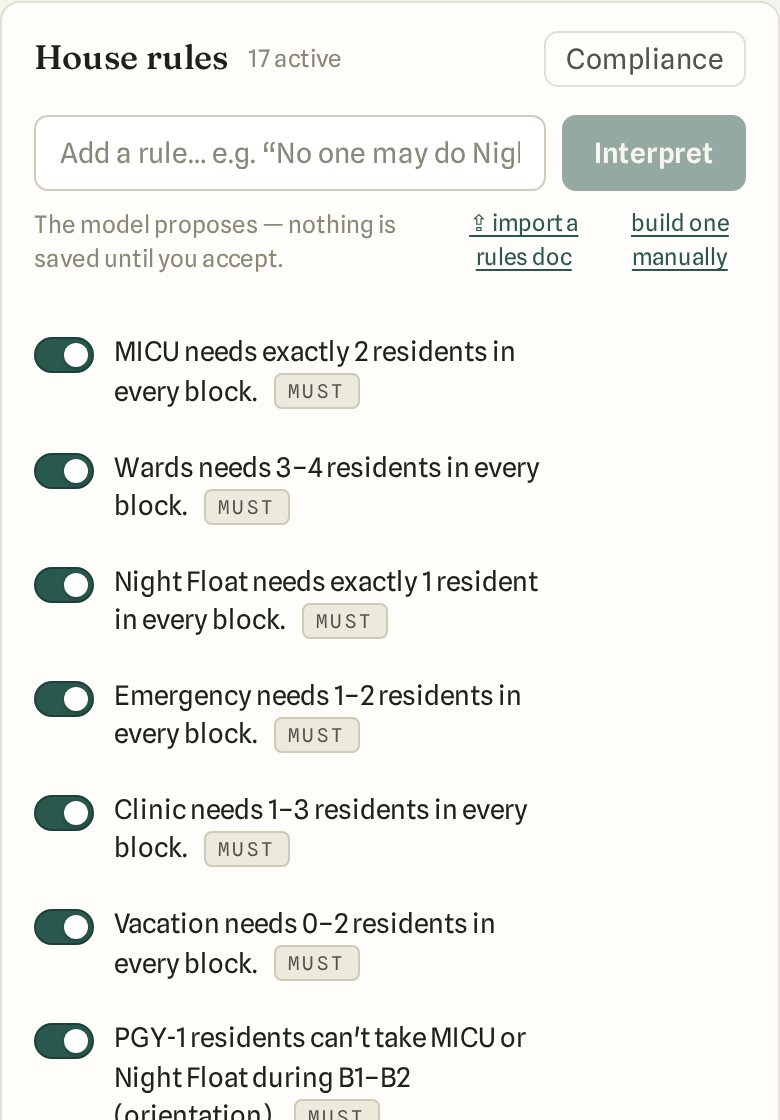
Type it the way you would say it: “MICU needs exactly 2 residents in every block.” ShiftCompass reads it back in its own words. Nothing is saved until you accept. A rule is a must, a should or a nice, and any rule can be switched off without deleting it.

The House rules panel: rules as plain sentences, each with a switch and a must/should/nice tag.

2

Generate.

Every rule that is on holds in the schedule that comes back. If the rules cannot all hold at once, the run says which ones collide and who is affected. Cells you have already decided stay pinned; the rest are filled around them.

The generated year grid: one row per resident, one column per block, a colored rotation chip in every cell.

3

Ask why.

Click any cell. It lists the rules that put that rotation there, what else was possible, and what blocked each alternative. These are the same reasons the generator used, written as sentences.

A cell's why: Dev Patel, block 3, MICU — the rules behind the assignment and what would have blocked each other rotation.

Call, from the same place.

Call rules are sentences too: “No one may take any call shift while on MICU.” “PGY-1 residents can't take Weekend Night in July.” “Everyone takes 4–8 call shifts this window.” “Spread call shifts evenly across residents within each PGY class.”

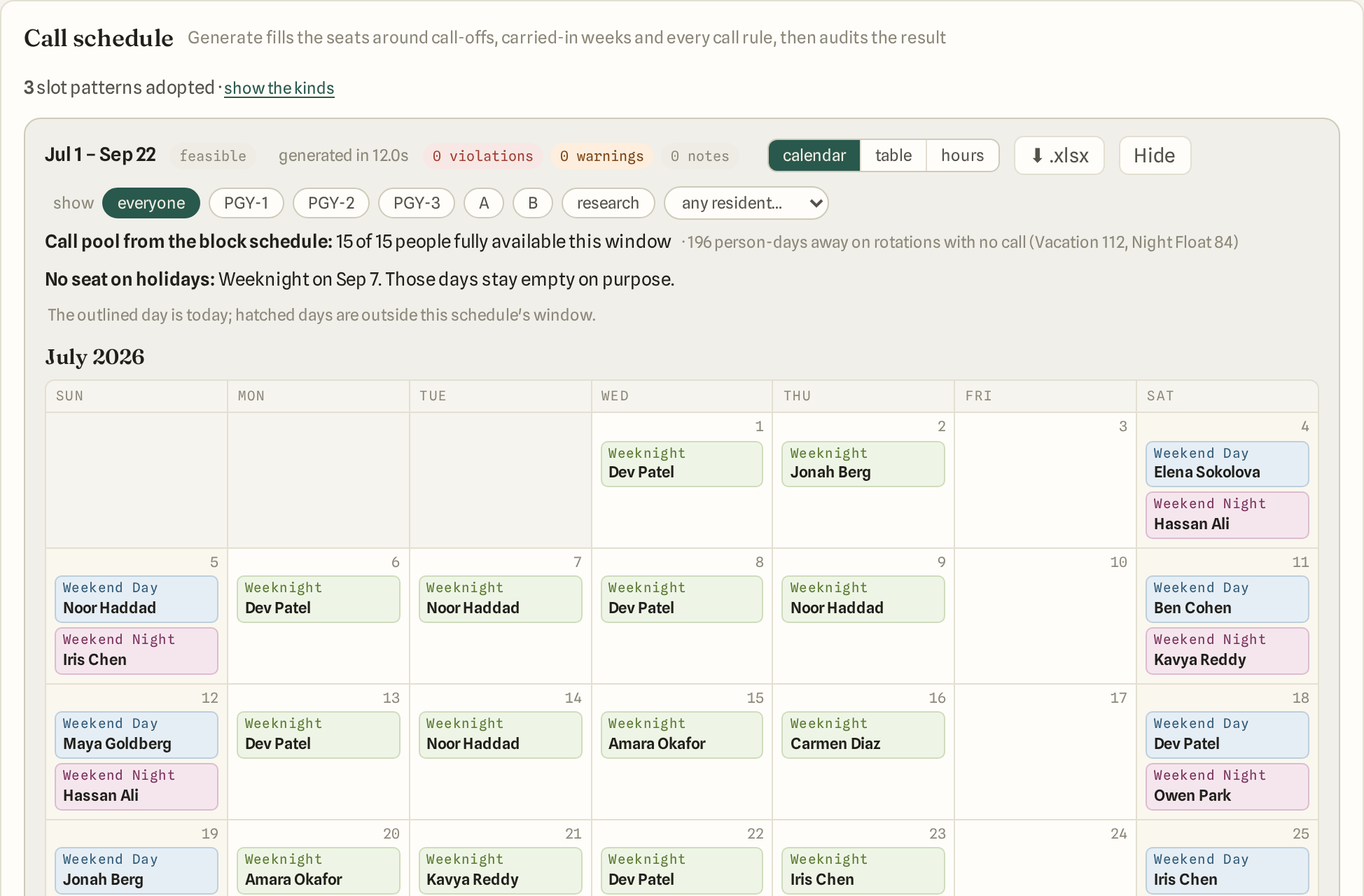
Generate fills the seats around call-off requests, rotations with no call, and holidays, then audits the result: double bookings, unfilled slots, hour budgets. The block schedule tells it who is away.

You can also upload the call workbook you already have and audit that instead.

The Call schedule card: the window Jul 1 – Sep 22, feasible, 0 violations, and the July calendar with Weeknight, Weekend Day and Weekend Night seats filled by name.
Lakeview's call schedule for July: every seat filled, zero violations, the days with no seat left empty on purpose.

Ask. An assistant that answers from your program's data.

Ask a question in plain English about your schedule, your rules, or how to use the app.

This is not a general chatbot. Before it answers, it reads your program's own data: the rules, the current schedule, past runs, the audit trail, and the app's own code and documentation. It can check a proposed rule against the schedule, and it can run a test solve to see what would change. It saves nothing.

Asked whether MICU could hold 3 residents a block instead of 2, it ran a one-minute test solve with the new count in place of the current rule, and reported that every other hard rule still held and which rotations the 13 extra MICU blocks would come from.

Every answer cites what it read: rule ids, run ids, cells. A second reader checks each draft before it posts. A draft the second reader does not accept is held for a person to review.

It only reads. It cannot change a rule, a cell, a person or a setting. A grounded answer takes a few minutes, not seconds.
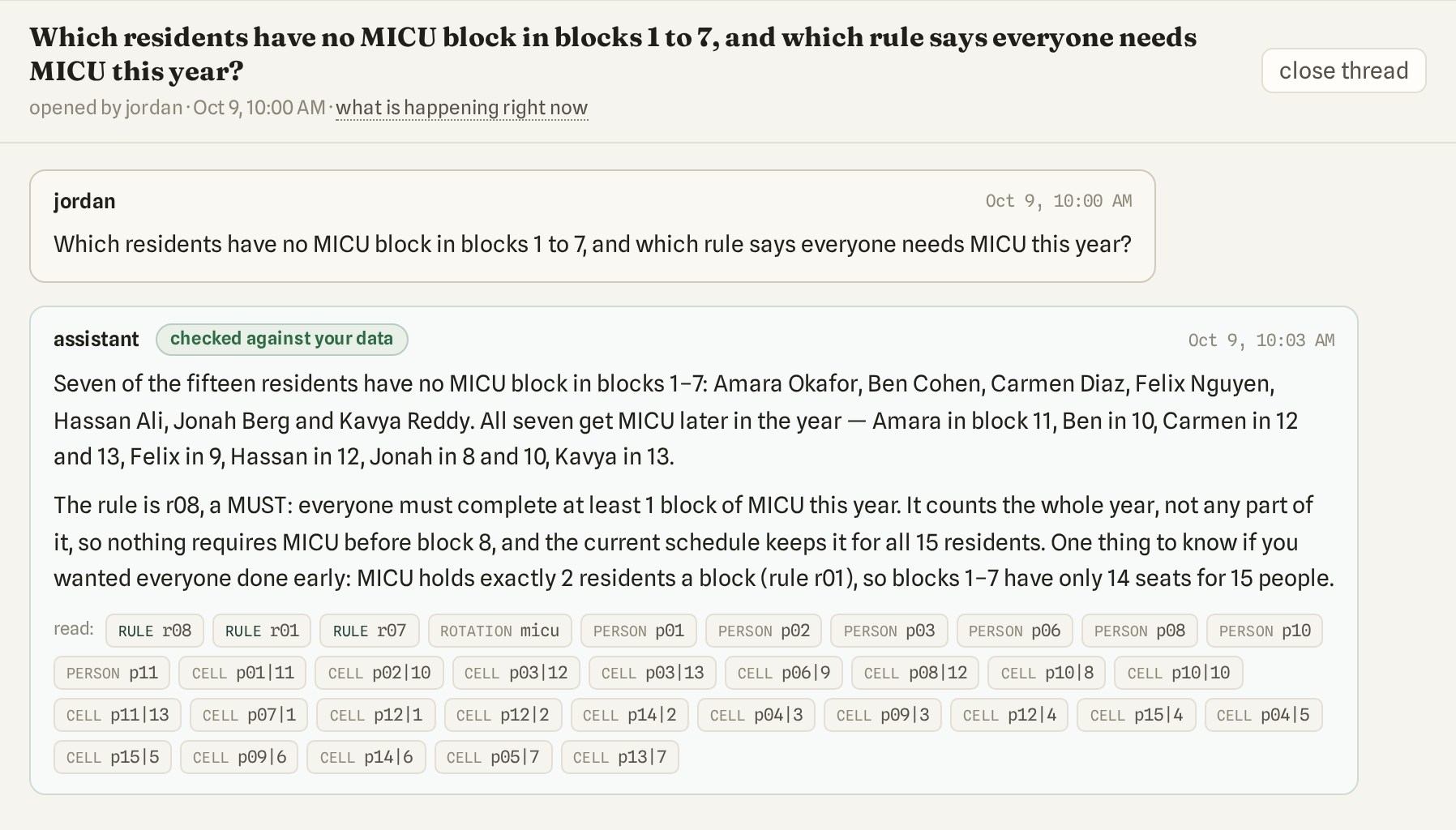
The program room: a coordinator asks which residents have no MICU block in blocks 1 to 7 and which rule requires MICU. The answer names seven residents and the rule, marked checked against your data, and lists every rule, resident and cell it read below the text.
The question, the answer, and under it every item the assistant read: the rules, the residents, the cells.

Residents see their year, and what happened to their requests.

Residents sign in to a portal of their own. They rank vacation blocks, name rotations they would rather avoid, and answer the program's own questions.

Preferences are data, not rules. They never outrank program policy. A rule a coordinator wrote always wins over a preference.

After each run, every resident sees which of their requests were honored. When one was not, “Why not?” shows the rule that would have broken and what they are on instead.

Coordinators see the same thing for the whole roster: one table, one row per resident, with a Honored column.

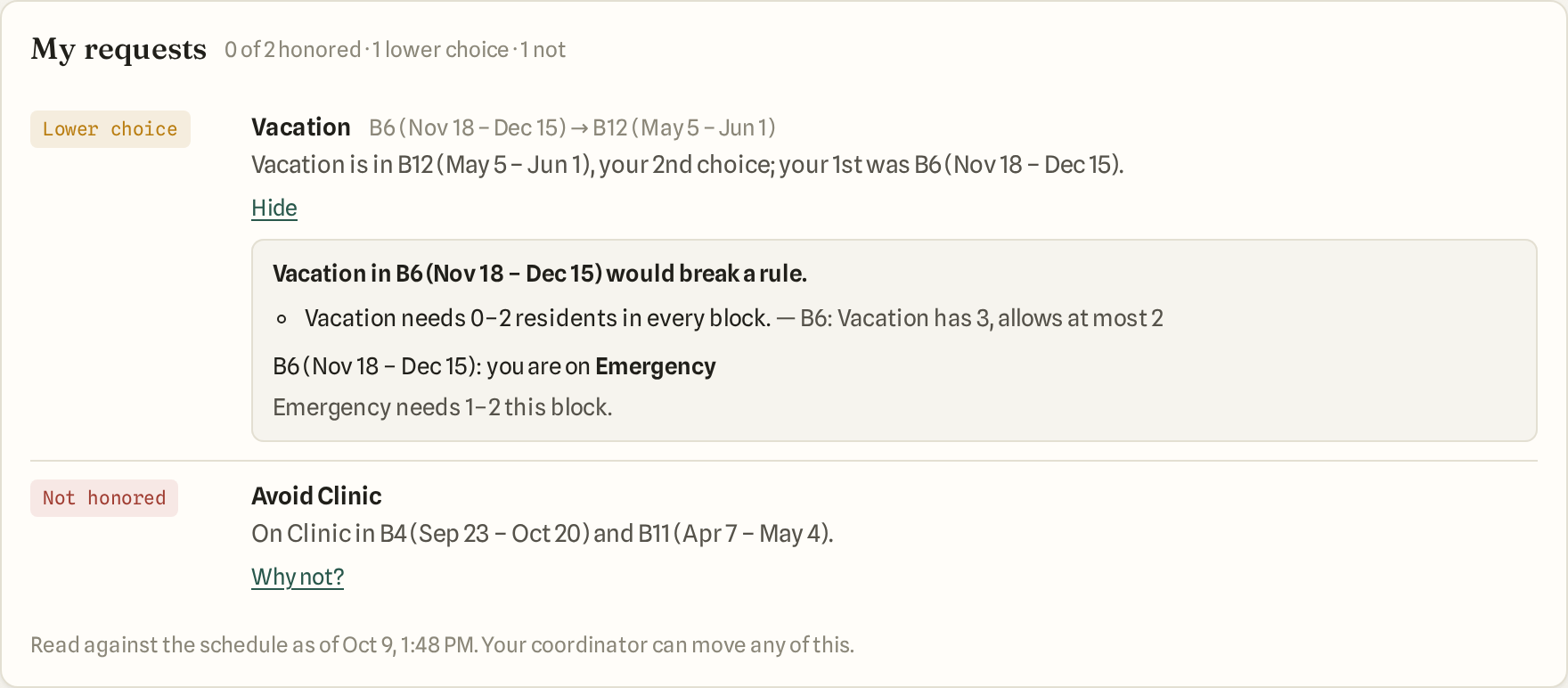
The My requests card on a resident's home page: Vacation, lower choice — in B12, the 2nd choice; why not opens and says Vacation in B6 would break the rule that Vacation needs 0–2 residents in every block. Avoid Clinic, not honored.
A resident's “My requests”: her second-choice vacation block, and the rule that stopped her first choice.
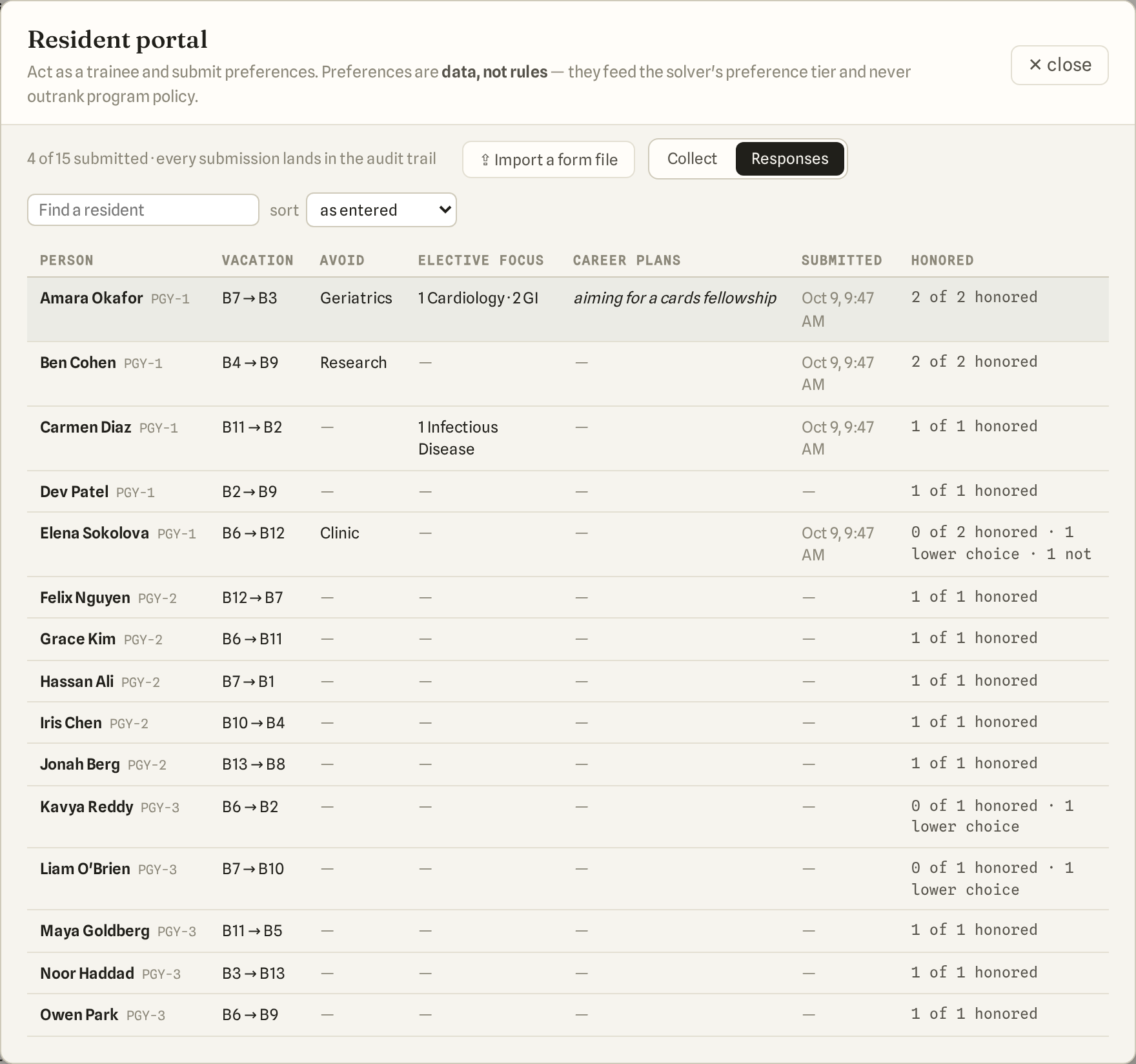
The Responses table the coordinator sees under People: one row per resident with vacation choices, rotations to avoid, elective focus, career plans, when they submitted, and a Honored column.
The coordinator's view: every resident's submission and a Honored column, read against the current schedule.

What you get.

  • Block schedules. The year plan: rotations across blocks, per resident, with pinned cells for what is already decided.
  • Call schedules. Generated from call rules, call-off requests and the block schedule, or uploaded and audited.
  • House rules. One list of every rule, in sentences. Compliance re-checks each one against the current schedule with an independent checker. A sentence the app cannot turn into a rule is logged as a policy gap, not guessed at.
  • Resident portal. Preferences in, outcomes out. Residents see their schedule and which of their requests were honored.
  • Imports. Bring last year's schedule workbook: ShiftCompass reads the roster, the rotations and rule candidates off it, each with its evidence, and you accept the ones that are real rules. Bring the schedule you already have as locked cells, a rules document, a call workbook, or a preferences form file.
  • Exports. Any block schedule or call schedule to Excel, stamped with when it was generated.
  • An audit trail. Every change is recorded with who and when: a rule, a pin, a roster edit, a run, a preference submission. Past runs stay readable.
  • Ask. Questions about your program's schedule, rules and history, answered from its data with citations.
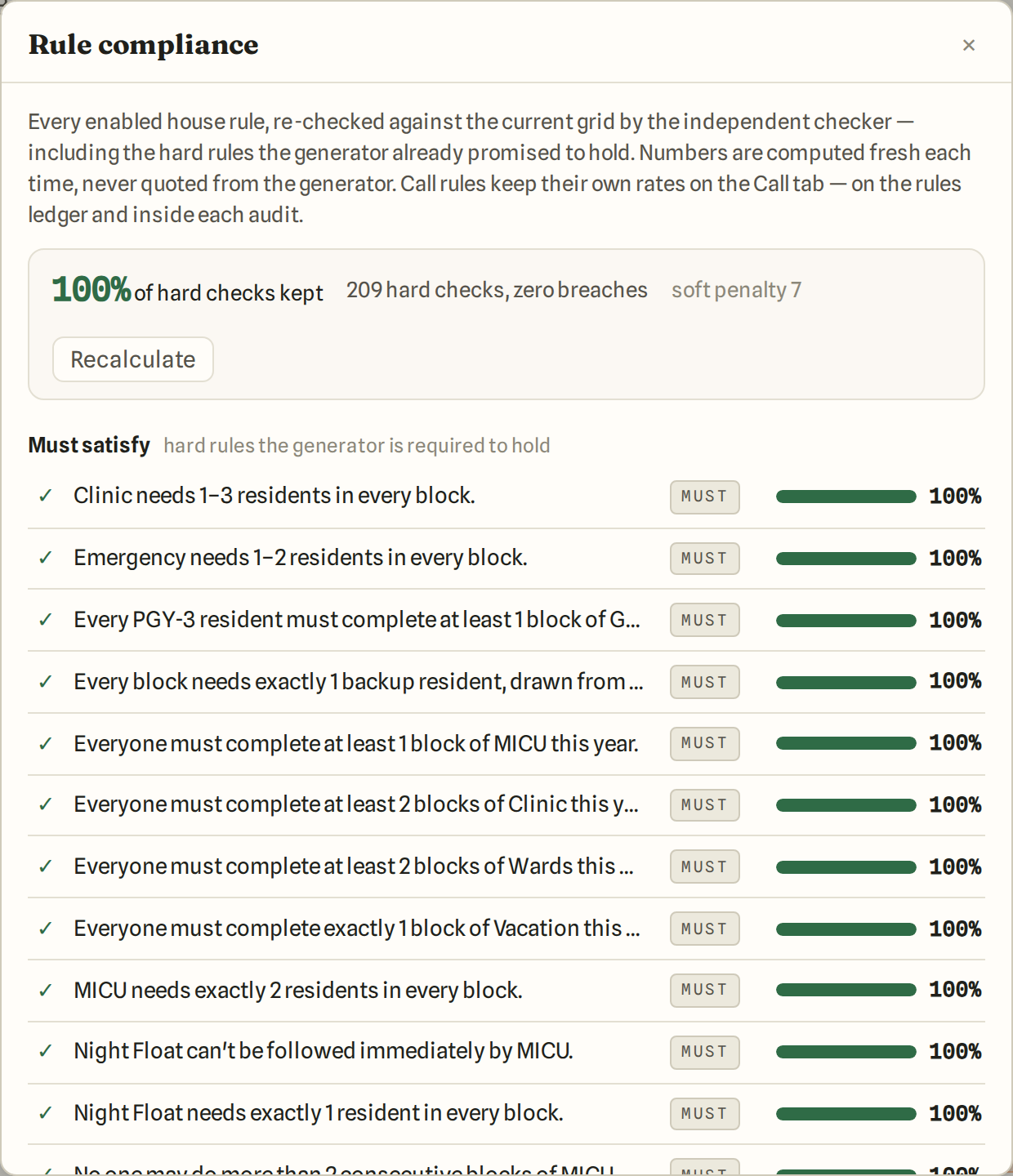
Rule compliance after a run: 100% of hard checks kept, zero breaches, each rule listed with its own bar.
Compliance, after a run: every rule re-checked, each with its own number.

You can run it yourself. We are here to help.

On your own

Everything on this page is something a coordinator can do alone: write rules, import last year's schedule, run Generate, read the why, export to Excel. The demo is the real app.

With us

When you want help, we set the program up with you: we import your schedule and your rules document, write the rules with you, and run the first schedule together. We stay on for questions after that. Inside the app, Ask answers how-to questions at any hour.

Pricing

Pilot pricing — talk to us.

Write to us

Look at anything. Nothing you click changes anything.

The live demo opens without a sign-in, on Lakeview: made-up residents, real rules, a generated block schedule and a generated call schedule. Read every rule, click every cell and ask why, run Compliance.

Open the live demo Live demo: coming shortly.

Questions we get.

Is AI making the schedule?
No. The schedule comes from Generate, a constraint solver that must satisfy every rule that is on. AI reads what you write — a rule sentence or a document — into a proposal you accept or reject, and it answers questions in Ask. No AI writes a cell.
Does it handle duty-hour rules?
Rules about hours are rules like any other: a rest gap after a shift, a cap on shifts per window, an hour budget per schedule. The call schedule has an hours view. ShiftCompass does not certify compliance with any body's standard; it enforces the rules you write and shows you the numbers.
Can we keep our spreadsheets?
Yes. Import the schedule you already have as locked cells, and export any schedule to Excel.
How long does setup take?
Bring last year's schedule workbook and your rules document. ShiftCompass reads the roster, the rotations and rule candidates off them in minutes, and you accept each one. Most of the setup time is deciding which rules are real.
Where does our data live?
In the United States, on Google Cloud. Sign-in uses your work email. Each program sees only its own data. Ask reads your program's data through a read-only account.
What does it cost?
Pilot pricing — talk to us.

Talk to us.

If you coordinate a program and want to see ShiftCompass on your own rules and roster, write to us at operations@shiftcompass.ai.

Write to us